
Appearance
File Backup and Restore
Protect BrowserStack Code Quality configuration files, user data, and application files with proper backup procedures.
Prerequisites
NOTE
Docker volume mapping (e.g., /home/${USER}/BrowserStackCodeQuality/gamma_data:/opt/gamma_data) is mandatory for backups to persist on the host system.
- Ensure version parity between source and destination machines
- Stop services on destination machine before restoration
- Require admin privileges and knowledge of installation directory
- Verify Docker volume mapping is configured correctly
File Backup Scope
Files Included in Backup:
- Configuration files and settings
- User uploads and attachments
- Custom rules and rule metadata
- Dashboard and saved view configurations
- Report templates and customizations
- Application logs and audit trails
CLI-Based File Backup
Use the built-in backup script for comprehensive file backup:
bash
docker exec -it <container_name_or_id> /opt/gamma/gamma_ui/dbscripts/scripts/backup_restore.sh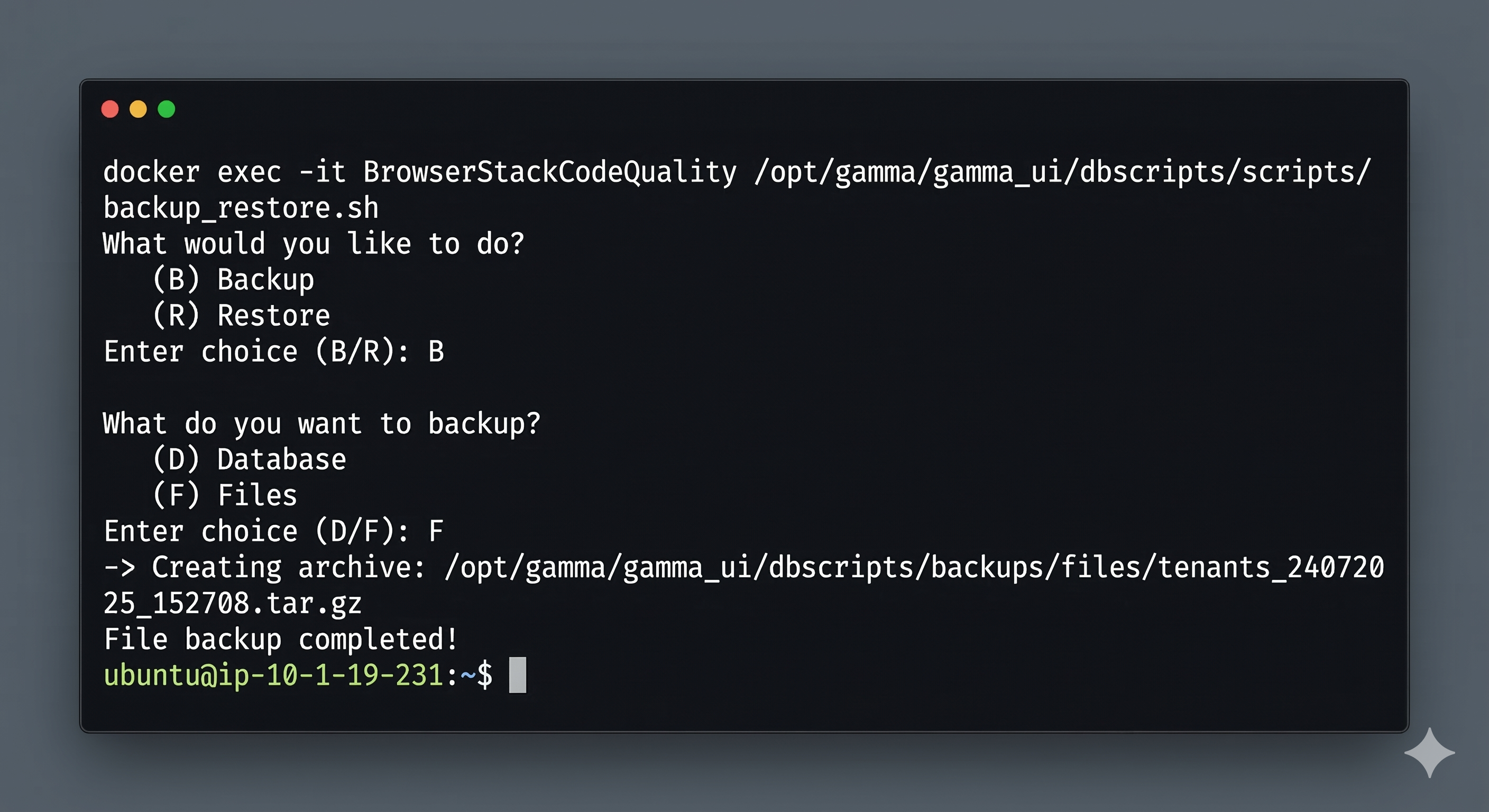
Backup Flow:
- Select Choice (B) for Backup
- Select Choice (F) for File backup
- Specify backup location and filename
- Backup archive saved to mapped volume directory
File Restore Process
bash
docker exec -it <container_name_or_id> /opt/gamma/gamma_ui/dbscripts/scripts/backup_restore.sh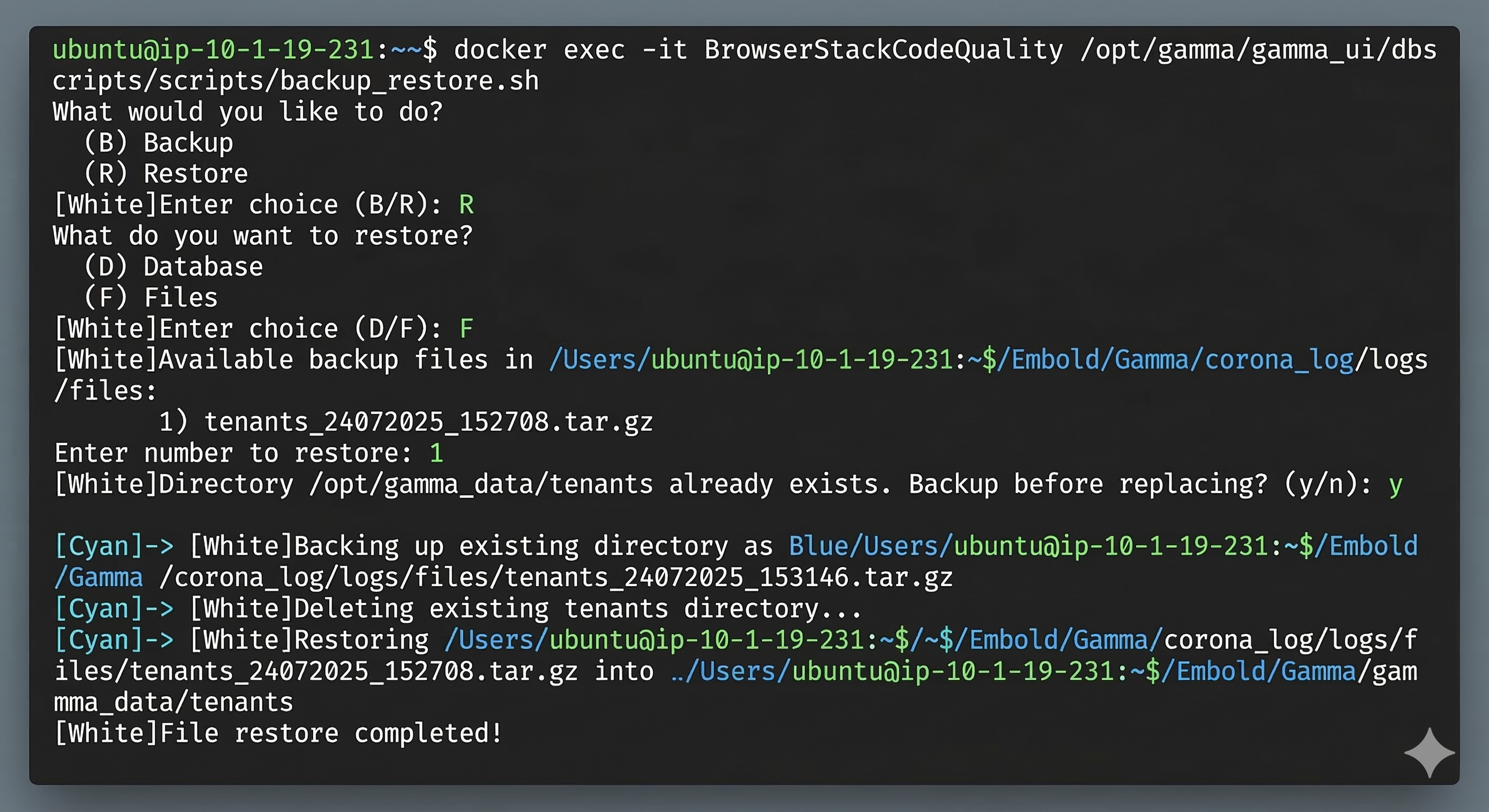
Restore Flow:
- Select Choice (R) for Restore
- Select Choice (F) for File restore
- Provide path to backup archive
WARNING
When prompted "Backup before replacing? (y/n)", strongly recommend entering y to create a safety backup before restoration.
- Confirm restore operation
- Restart services after restoration
Manual Docker Volume Backup
For direct volume backup without using the built-in script:
bash
# Stop container
docker stop BrowserStackCodeQuality

# Backup volumes
docker run --rm \
  -v /home/${USER}/BrowserStackCodeQuality/gamma_data:/data \
  -v $(pwd):/backup \
  alpine tar czf /backup/files_backup_$(date +%Y%m%d).tar.gz /data

# Restart container
docker start BrowserStackCodeQuality
Manual Docker Volume Restore
bash
# Stop container
docker stop BrowserStackCodeQuality

# Restore volumes
docker run --rm \
  -v /home/${USER}/BrowserStackCodeQuality/gamma_data:/data \
  -v $(pwd):/backup \
  alpine tar xzf /backup/files_backup_YYYYMMDD.tar.gz

# Restart container
docker start BrowserStackCodeQuality
Configuration File Backup
For specific configuration backup:
bash
# Backup configuration directory
tar -czf config_backup_$(date +%Y%m%d).tar.gz \
  /home/${USER}/BrowserStackCodeQuality/gamma_data/config/

# Restore configuration
tar -xzf config_backup_YYYYMMDD.tar.gz -C /home/${USER}/BrowserStackCodeQuality/gamma_data/
Automated File Backups
Comprehensive File Backup Script
Create /opt/browserstack-cq-file-backup.sh:
bash
#!/bin/bash
# BrowserStack Code Quality File Backup Script

# Configuration
CONTAINER_NAME="BrowserStackCodeQuality"
BACKUP_BASE_DIR="/home/${USER}/BrowserStackCodeQuality/backups"
SOURCE_DIR="/home/${USER}/BrowserStackCodeQuality/gamma_data"
RETENTION_DAYS=14
LOG_FILE="$BACKUP_BASE_DIR/file_backup.log"
DATE=$(date +%Y%m%d_%H%M%S)

# Create backup directory
mkdir -p "$BACKUP_BASE_DIR"

# Logging function
log_message() {
    echo "$(date '+%Y-%m-%d %H:%M:%S') - $1" | tee -a "$LOG_FILE"
}

# Check prerequisites
check_prerequisites() {
    # Check if container is running
    if ! docker ps --format '{{.Names}}' | grep -q "^${CONTAINER_NAME}$"; then
        log_message "ERROR: Container $CONTAINER_NAME is not running"
        exit 1
    fi

    # Check available disk space (require at least 2GB free)
    AVAILABLE_SPACE=$(df "$BACKUP_BASE_DIR" | awk 'NR==2 {print $4}')
    if [[ $AVAILABLE_SPACE -lt 2097152 ]]; then
        log_message "WARNING: Less than 2GB disk space available"
    fi

    # Verify source directory exists
    if [[ ! -d "$SOURCE_DIR" ]]; then
        log_message "ERROR: Source directory $SOURCE_DIR does not exist"
        exit 1
    fi
}

# Create incremental backup
create_incremental_backup() {
    log_message "Starting incremental file backup"

    BACKUP_FILE="$BACKUP_BASE_DIR/files_incremental_${DATE}.tar.gz"
    LAST_BACKUP_DATE_FILE="$BACKUP_BASE_DIR/.last_backup_date"

    # Find files modified since last backup
    if [[ -f "$LAST_BACKUP_DATE_FILE" ]]; then
        LAST_BACKUP_DATE=$(cat "$LAST_BACKUP_DATE_FILE")
        log_message "Creating incremental backup since $LAST_BACKUP_DATE"

        find "$SOURCE_DIR" -type f -newer "$LAST_BACKUP_DATE_FILE" -print0 | \
            tar --null -T - -czf "$BACKUP_FILE"
    else
        log_message "Creating full backup (no previous backup date found)"
        tar -czf "$BACKUP_FILE" -C "$(dirname "$SOURCE_DIR")" "$(basename "$SOURCE_DIR")"
    fi

    # Update last backup date
    touch "$LAST_BACKUP_DATE_FILE"

    log_message " File backup completed: $BACKUP_FILE"
}

# Create full backup using container script (if available)
create_container_backup() {
    log_message "Attempting container-based file backup"

    # Check if backup script exists
    if docker exec "$CONTAINER_NAME" test -f /opt/gamma/gamma_ui/dbscripts/scripts/backup_restore.sh; then
        BACKUP_FILE="$BACKUP_BASE_DIR/files_container_${DATE}.tar.gz"

        # Use container's backup script
        if docker exec "$CONTAINER_NAME" /opt/gamma/gamma_ui/dbscripts/scripts/backup_restore.sh -b -f -o "/opt/gamma_data/backup/files_${DATE}.tar.gz"; then
            # Move backup to persistent location
            mv "$SOURCE_DIR/backup/files_${DATE}.tar.gz" "$BACKUP_FILE"
            log_message " Container backup completed: $BACKUP_FILE"
        else
            log_message " Container backup failed, falling back to direct backup"
            create_direct_backup
        fi
    else
        log_message "Container backup script not found, using direct backup method"
        create_direct_backup
    fi
}

# Direct volume backup method
create_direct_backup() {
    log_message "Creating direct volume backup"

    BACKUP_FILE="$BACKUP_BASE_DIR/files_direct_${DATE}.tar.gz"

    # Stop container services temporarily for consistent backup
    docker exec "$CONTAINER_NAME" supervisorctl stop all 2>/dev/null || true

    # Create backup
    tar -czf "$BACKUP_FILE" -C "$(dirname "$SOURCE_DIR")" "$(basename "$SOURCE_DIR")" \
        --exclude="*.log" \
        --exclude="temp/*" \
        --exclude="cache/*"

    # Restart services
    docker exec "$CONTAINER_NAME" supervisorctl start all 2>/dev/null || true

    log_message " Direct backup completed: $BACKUP_FILE"
}

# Cleanup old backups
cleanup_old_backups() {
    log_message "Cleaning up backups older than $RETENTION_DAYS days"

    find "$BACKUP_BASE_DIR" -name "files_*.tar.gz" -mtime +$RETENTION_DAYS -delete

    # Also clean up log files older than 30 days
    find "$BACKUP_BASE_DIR" -name "*.log" -mtime +30 -delete
}

# Verify backup integrity
verify_backup() {
    LATEST_BACKUP=$(ls -t "$BACKUP_BASE_DIR"/files_*.tar.gz 2>/dev/null | head -1)

    if [[ -n "$LATEST_BACKUP" ]]; then
        if tar -tzf "$LATEST_BACKUP" >/dev/null 2>&1; then
            log_message " Backup integrity verification passed"
        else
            log_message " Backup integrity verification failed"
            return 1
        fi
    fi
}

# Main execution
main() {
    log_message "Starting BrowserStack Code Quality file backup process"

    check_prerequisites
    create_container_backup
    cleanup_old_backups
    verify_backup

    log_message "File backup process completed successfully"
}

# Execute main function
main "$@"
Cron Schedule Configuration
bash
# Make script executable
chmod +x /opt/browserstack-cq-file-backup.sh

# Daily incremental backups at 3 AM
(crontab -l 2>/dev/null; echo "0 3 * * * /opt/browserstack-cq-file-backup.sh incremental >> /var/log/browserstack-cq-file-backup.log 2>&1") | crontab -

# Weekly full backup (Sundays at 2 AM)
(crontab -l 2>/dev/null; echo "0 2 * * 0 /opt/browserstack-cq-file-backup.sh full >> /var/log/browserstack-cq-file-backup.log 2>&1") | crontab -

# Monthly cleanup (first day of month at 1 AM)
(crontab -l 2>/dev/null; echo "0 1 1 * * find /home/${USER}/BrowserStackCodeQuality/backups/ -name 'files_*.tar.gz' -mtime +90 -delete") | crontab -
Backup Verification
bash
# Check backup file integrity
tar -tzf files_backup_YYYYMMDD.tar.gz > /dev/null && echo "Backup archive is valid"

# List backup contents
tar -tzf files_backup_YYYYMMDD.tar.gz | head -20

# Check backup file size
ls -lh files_backup_*.tar.gz
Selective File Recovery
For recovering specific files without full restore:
bash
# Extract specific files from backup
tar -xzf files_backup_YYYYMMDD.tar.gz path/to/specific/file

# Copy to container
docker cp specific/file BrowserStackCodeQuality:/opt/gamma_data/path/to/file
Best Practices
- Safety Backup: Always accept the "Backup before replacing?" prompt during restore
- Service Shutdown: Stop services before file restoration to prevent data corruption
- Incremental Backups: Consider incremental backups for large file sets to reduce backup time
- Test Recovery: Periodically test file restore procedures in non-production environment
- Secure Storage: Store file backups in encrypted, access-controlled locations
- Version Control: Maintain backup file naming conventions with timestamps and versions
Troubleshooting
Backup Creation Issues
Script Permission Errors:
bash
# Check script permissions in container
docker exec BrowserStackCodeQuality ls -la /opt/gamma/gamma_ui/dbscripts/scripts/backup_restore.sh

# Fix script permissions if needed
docker exec BrowserStackCodeQuality chmod +x /opt/gamma/gamma_ui/dbscripts/scripts/backup_restore.sh
Disk Space Issues:
bash
# Check available space in backup directory
df -h /home/${USER}/BrowserStackCodeQuality/backups/

# Check volume usage
du -sh /home/${USER}/BrowserStackCodeQuality/gamma_data/

# Emergency cleanup of large files
find /home/${USER}/BrowserStackCodeQuality/gamma_data/logs/ -name "*.log" -size +100M -mtime +7 -delete
find /home/${USER}/BrowserStackCodeQuality/gamma_data/temp/ -type f -mtime +1 -delete
Container Access Issues:
bash
# Verify container is running and accessible
docker ps | grep BrowserStackCodeQuality
docker exec BrowserStackCodeQuality ls /opt/gamma_data/

# Check volume mounts
docker inspect BrowserStackCodeQuality | grep -A 10 Mounts

# Test container file system access
docker exec BrowserStackCodeQuality touch /opt/gamma_data/test_file && docker exec BrowserStackCodeQuality rm /opt/gamma_data/test_file
Restore Issues and Solutions
Archive Corruption:
bash
# Test archive integrity before restore
tar -tzf backup_file.tar.gz > /dev/null && echo "Archive is valid" || echo "Archive is corrupted"

# List archive contents without extracting
tar -tzf backup_file.tar.gz | head -20

# Partial restore if archive is partially corrupted
tar -xzf backup_file.tar.gz --ignore-failed-read
File Permission Issues After Restore:
bash
# Fix ownership after restore
docker exec BrowserStackCodeQuality chown -R gamma:gamma /opt/gamma_data/

# Fix critical file permissions
docker exec BrowserStackCodeQuality chmod 755 /opt/gamma_data/config/
docker exec BrowserStackCodeQuality chmod 644 /opt/gamma_data/config/*.properties
Service Startup Issues After Restore:
bash
# Check configuration file syntax
docker exec BrowserStackCodeQuality /opt/gamma/gamma_ui/bin/validate_config.sh

# Review startup logs for errors
docker logs BrowserStackCodeQuality --tail 100 | grep -i error

# Restart services manually if needed
docker exec BrowserStackCodeQuality supervisorctl restart all
Performance Optimization
Large File Set Backups:
bash
# Use incremental backups for large datasets
tar -czf backup.tar.gz --listed-incremental=backup.snar /home/${USER}/BrowserStackCodeQuality/gamma_data/

# Exclude non-essential files from backup
tar -czf backup.tar.gz \
    --exclude="*.log" \
    --exclude="temp/*" \
    --exclude="cache/*" \
    --exclude="*.tmp" \
    /home/${USER}/BrowserStackCodeQuality/gamma_data/

# Use compression with faster algorithms for speed
tar -cf - /home/${USER}/BrowserStackCodeQuality/gamma_data/ | pigz > backup.tar.gz
Network-Based Backup Storage:
bash
# SCP to remote server
tar -czf - /home/${USER}/BrowserStackCodeQuality/gamma_data/ | \
    ssh backup-server "cat > /backup/browserstack-cq/files_$(date +%Y%m%d).tar.gz"

# Rsync for incremental network backups
rsync -avz --delete /home/${USER}/BrowserStackCodeQuality/gamma_data/ \
    backup-server:/backup/browserstack-cq/live/
Related Documentation
- Database Backup and Restore – Database backup procedures
- Updates Guide – Version upgrade procedures
- Memory Settings – Performance optimization