
Appearance
Scanning Workflows
Choose the analysis method that matches your team's development stage.
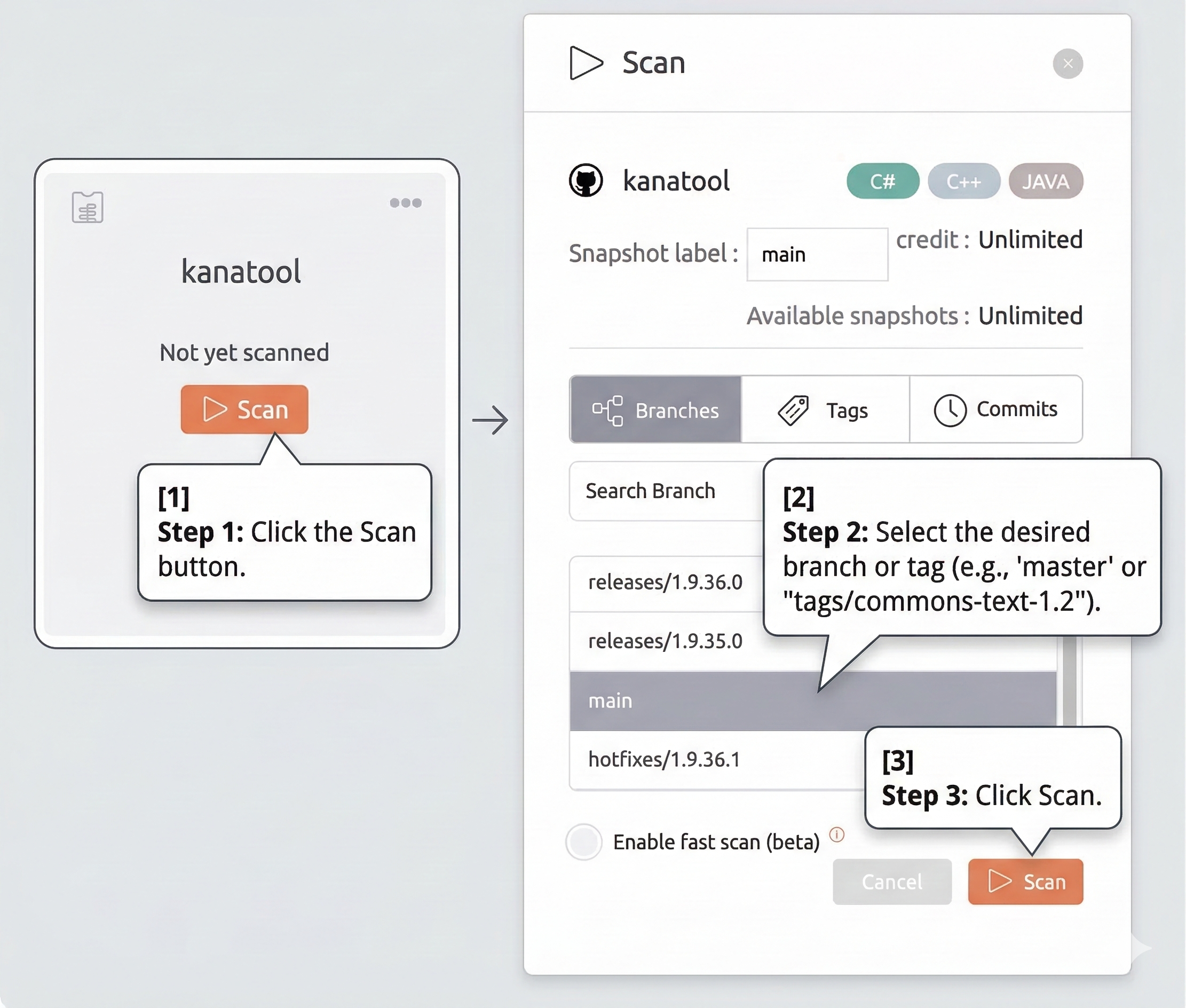
1. UI scan
- Click the Scan button.
- Select the desired branch or tag (e.g.,
masterortags/commons-text-1.2). - Click Scan.
NOTE
Remote Repository Types: UI scan is not available for remote repository types. Use CLI & Remote Scan instead.
2. CI/CD & Remote Scan (CLI)
Stage: Pipeline / Build Integrate analysis into Jenkins, GitHub Actions, or local machines using our lightweight CLI scanner. Perfect for custom build environments.
3. Pull Request Analysis
Stage: Code Review / Merge The most powerful workflow. Automatically analyze every PR and get inline comments and status checks directly in GitHub, GitLab, Bitbucket, or Azure DevOps.
4. Commit Analysis
Stage: Development / On-Push Trigger a scan every time a developer pushes code to a branch. Best for tracking quality trends over time without waiting for a PR.
5. Gated Commit Analysis
Stage: Pre-Commit / Enforcement Ensure that "bad code" never even reaches your repository. Block commits that fail your quality gates.